 Terrafold
Chapter 13
Licence, trial and viewer mode
Terrafold works fully offline, and so does its licence. This short chapter explains the trial, what happens when it ends, and how to enter a licence key.
The first start
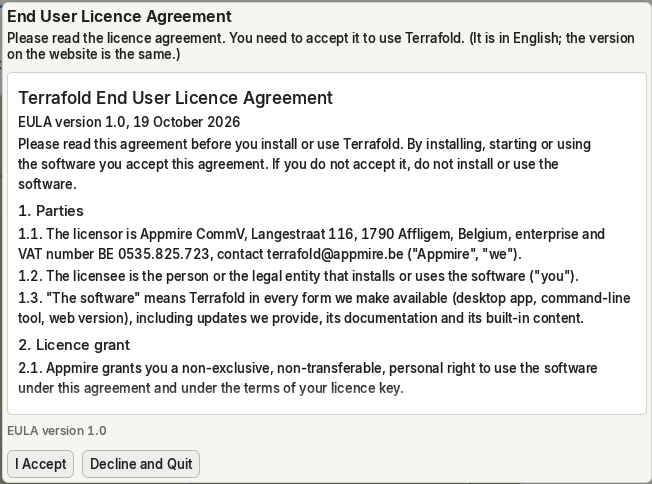
The first time Terrafold starts, it shows the end user licence agreement. Read it and choose I Accept to continue. You can read it again at any time with Help ▸ Licence Agreement, or on the website.
The 30-day trial
Without a licence key, Terrafold is a full trial for 30 days from the first start. Every feature in this guide works. The status bar shows how many days are left.

A trial never ends while you work: a session that started on the last day keeps every feature until you close Terrafold.
Viewer mode
After the trial, or when your licence doesn't cover the version you run, Terrafold starts in viewer mode. The status bar says so, with Buy and Enter key buttons.
In viewer mode you can still open and look at models, use scenes, change things to try them out, and export images and renders. You can't save, export 3D models, or export the CSV reports. Nothing is lost: recovery copies are still written, and as soon as you enter a key you can save, without restarting.
Enter a licence key
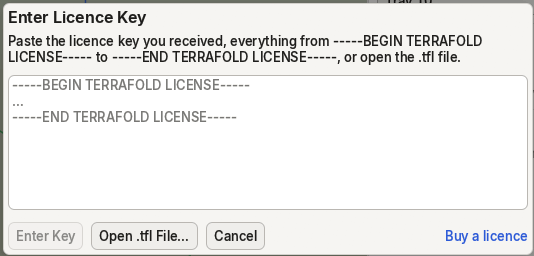
A licence key is a short block of text you receive by e-mail, or a .tfl file. Terrafold checks it on your own computer: nothing is sent anywhere.
- Choose Help ▸ Enter Licence Key….
- Paste the key (everything from
-----BEGIN TERRAFOLD LICENSE-----to-----END TERRAFOLD LICENSE-----), or choose Open .tfl File…. - Choose Enter Key.
Help ▸ About Terrafold and the status bar then show who the licence is for, and Help ▸ License shows its type, dates and the versions it covers. A perpetual licence covers the versions released during its first year, forever; a subscription works until its end date, plus 14 days to renew. To buy one, choose Help ▸ Buy Terrafold… or see the buy page. The licence documentation has the details, including terrafold-cli license for the command line.