 Terrafold
Chapter 12
Working with others
A design rarely stays in one program. Surveys arrive as DXF, furniture as glTF, a client's builder wants an OBJ, and you may want to automate the boring parts. This chapter is a short tour of the ways in and out of Terrafold.
The .tfo file
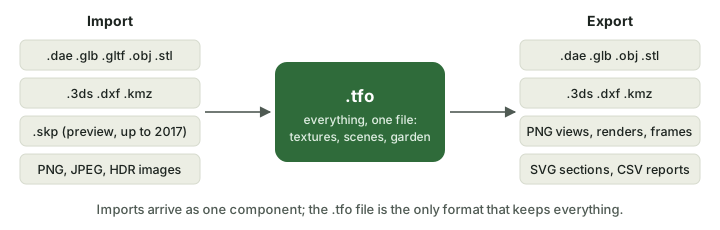
A .tfo file holds everything: geometry, groups and components, tags, materials with their textures, scenes, matched photos, garden elements, plants and the garden time, the environment and a preview. Textures are inside the file, so one file is all you share. When you save over a file, the previous version is kept next to it as <name>.backup.tfo.
Import
File ▸ Import… brings a model into the open one as one component, named after the file, that follows the pointer until you click to place it. Its materials come along. Terrafold reads COLLADA (.dae), glTF (.glb, .gltf), OBJ, STL, 3DS, DXF, KMZ and other .tfo files, and it imports .skp files (a preview, for files saved by versions up to 2017).
Export
File ▸ Export ▸ 3D Model… writes COLLADA, glTF binary, OBJ, STL, 3DS, DXF and KMZ. Hidden geometry is left out of most of them. Pick the format the other program reads best: glTF for real-time viewers and game engines (it keeps physically based materials), OBJ or COLLADA for other modellers, STL for 3D printing, DXF for CAD drawings.
Images, sections, animations and the garden reports have their own exports, see chapter 11 and chapter 9.
Extensions and the Script Console
Everything is a command, so everything can be scripted. Window ▸ Script Console runs small scripts in the Rhai language, with the same commands you use:
run("rectangle", #{ corner: [0, 0, 0], size: ["2m", "1m"] });
model_info().counts
Extensions ▸ Extension Manager installs extensions: folders or .zip files with a script that adds its own commands, menu items and buttons. Extensions run in a sandbox: they can't read your files or reach the network, and each command they run is one step of Undo. See Extensions in the documentation.
The command-line tool
The desktop packages include terrafold-cli, which works on models without a window: terrafold-cli convert converts between formats, export and render make images, info summarises a file, and run runs a script of commands on a model and saves the result. The figures and model files of this guide were made that way. Run terrafold-cli --help, or see File formats in the documentation.